 RemoveBackgroundMusic
One file does not tell you how many soundtracks it contains
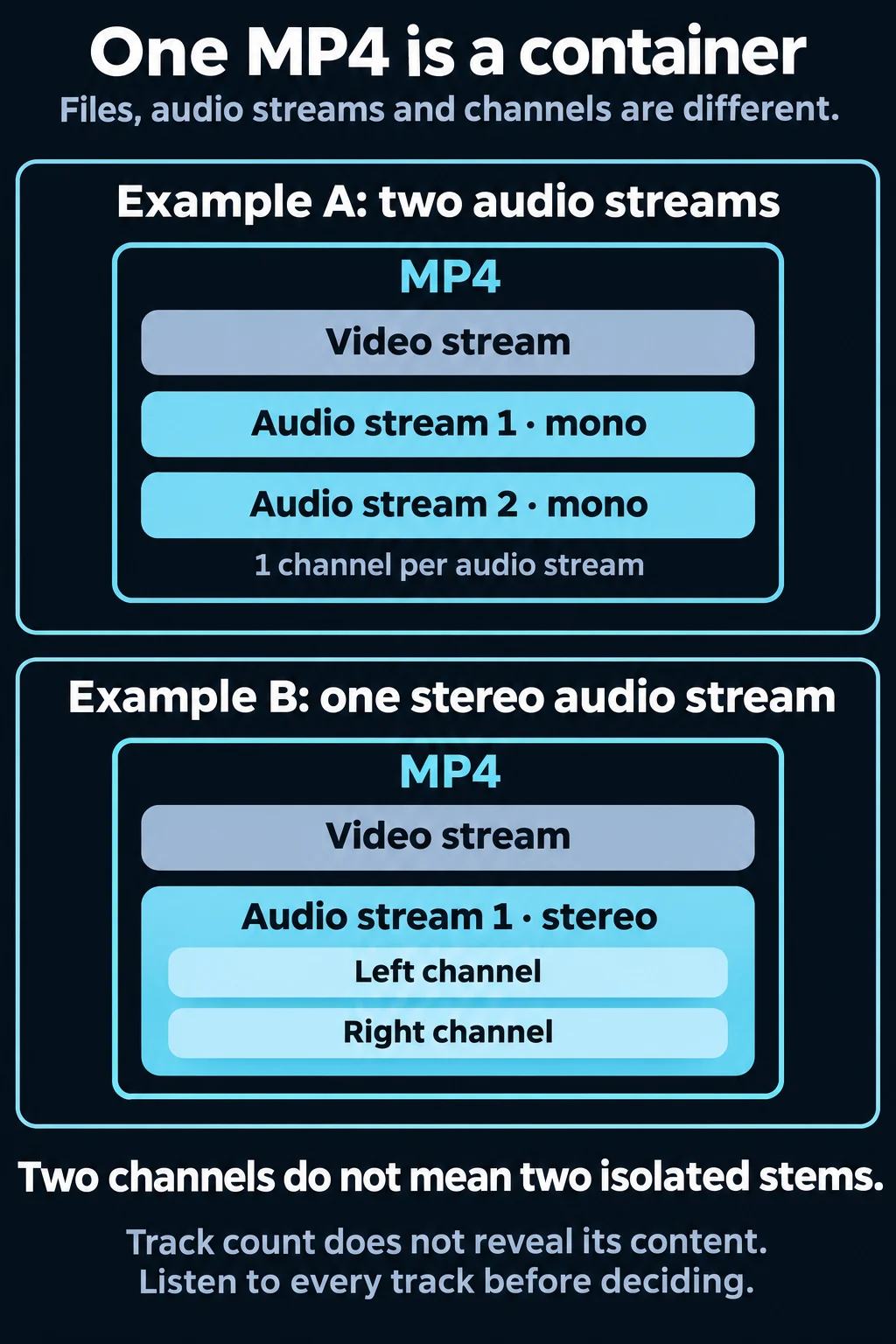
The diagram illustrates structure only. It does not identify any track as clean dialogue or music. The two-stream versus two-channel distinction is also checked in the reproducible container test below.
An MP4 packages picture, sound and timing information. Its filename cannot tell you whether it holds one stereo mix, several alternative soundtracks or an unusually useful clean source. Multiple tracks can be different languages or commentary versions rather than dialogue and music stems. Listen to each independently before deciding that one solves your problem.
A track and a channel are different things. Stereo has left and right channels within a stream. Two channels do not establish that one contains only music and the other only speech. Muting the left side can damage the image and still leave music. Likewise, two separate streams can both be complete mixes. The count tells you what to investigate, not what sounds are isolated.
If you can ask the creator for the project, linked audio or a matching music-free master, do that first. The missing-stems guide includes a request template. An M&E file contains music and effects; it is not automatically a dialogue track without music.
Inspect the audio streams before paying for separation
Open the source in an editor capable of displaying its audio streams and audition each track alone. Check language, content, channel layout and timing. A standard player may only play its default selection, so hearing music during ordinary playback does not establish that every alternative contains music too.
For a command-line inspection, a local copy of FFprobe can report stream structure:
ffprobe -v error -select_streams a -show_entries stream=index,codec_name,channels,channel_layout -of json input.mp4Replace `input.mp4` with your own local working copy. This command inspects stream information; it does not separate sound or prove that a track is a clean stem. Avoid copying private filenames or media metadata into public reports. If the tool cannot read the file, resolve that format problem before making an audio-quality decision.
Reproducible container test
For this guide, a local FFmpeg 6.0 test generated two seconds of black picture and test tones. One MP4 contained two mono AAC audio streams. A second MP4 contained one stereo AAC audio stream with two channels. FFprobe reported those structures, and automated assertions checked the counts. To reproduce the structure locally, use an empty working folder and a local FFmpeg installation. These commands generate only test tones and black picture. The `-n` flag refuses to overwrite existing outputs:
ffmpeg -n -f lavfi -i color=c=black:s=160x90:r=24:d=2 -f lavfi -i sine=frequency=440:duration=2 -f lavfi -i sine=frequency=880:duration=2 -map 0:v -map 1:a -map 2:a -c:v libx264 -pix_fmt yuv420p -c:a aac two-streams.mp4
ffmpeg -n -f lavfi -i color=c=black:s=160x90:r=24:d=2 -f lavfi -i sine=frequency=440:duration=2 -map 0:v -map 1:a -ac 2 -c:v libx264 -pix_fmt yuv420p -c:a aac stereo-stream.mp4
ffprobe -v error -select_streams a -show_entries stream=index,codec_name,channels,channel_layout -of json two-streams.mp4
ffprobe -v error -select_streams a -show_entries stream=index,codec_name,channels,channel_layout -of json stereo-stream.mp4
The first output reports two audio streams with one channel each; the second reports one audio stream with two channels. This is the distinction to check, rather than assuming the MP4 extension or a stereo label identifies isolated dialogue.
This test proves only that stream count and channel count are distinct. It contains no speech, does not demonstrate AI music removal, and does not validate browser track selection. It is not a customer case or a realistic soundtrack benchmark. A real recording must still be auditioned.
What AI can estimate from a mixed soundtrack
When there is no clean alternative, source separation attempts to estimate components of the existing samples. Those estimates may leave some score in the residual track or place wanted speech and effects in the component being removed. The output should be assessed as a new useful version, not labeled the original dialogue recording.
Research on the Cocktail Fork Problem treats speech, music and sound effects as separation targets. That distinction supports asking what needs to remain; it does not establish a product success rate. No published research score guarantees that a whisper, a sung lyric and a tonal game effect in your particular file will land in the desired output.
For this site, choose Dialogue & sound effects when the scene matters, or Dialogue only when people speaking are the priority. Read the keep effects guide before accepting a voice-only result for a scene that depends on footsteps, room tone or impacts.
A five-step preview test for your actual MP4
1. Keep the original and define success
Use the strongest authorized export and keep it untouched. Write down the important words and events: a name, a quiet reply, a door or the ambience after a cut. If exact production stems are required for delivery, obtain those instead of treating a separator as an archival recovery service.
2. Select the hardest overlap
Choose music underneath speech and an essential event. The available free preview is up to 15 seconds, with the actual range shown in the tool. Short sources have a smaller available sample. A clean introduction does not test the action sequence later in the video.
3. Compare at the same timestamp
Follow the words, then the effects, then the spaces between them. Compare at a similar perceived dialogue level. Listen for changed consonants, thin or watery speech, missing event tails, unstable ambience and music returning between phrases. Switching to a different moment can hide those changes.
4. Apply a clear rejection rule
Stop if an important word loses meaning, a required event disappears or the residual score remains unsuitable. A result with more music suppression can be worse for your project. Reprocessing an already damaged estimate is not a dependable way to recover deleted detail. Return to the source and reconsider the edit.
5. Inspect the delivered file
After approving the preview and current quote, check the complete output under picture. Listen to regions the preview did not cover and inspect sync near the beginning, middle and end. A successful processing response does not establish an acceptable soundtrack or a compatible final container.
A decision matrix without invented success rates
Swipe sideways or use arrow keys while this table is focused to compare all columns.
| Input condition | What to try | What could invalidate the result |
|---|---|---|
| Separate usable dialogue track exists | Use it directly | Different cut, timing or language |
| Quiet speech overlaps loud score | Preview that overlap | Missing consonants or unstable voice |
| Dense effects overlap percussion | Include effects in the sample | Lost impacts or shortened tails |
| Singing overlaps talking | Compare the wanted voice carefully | Singer residue or damaged speaker |
| Heavily compressed export | Ask for a stronger original | Encoding damage already obscures detail |
These are review conditions, not measured candidate rankings. This guide makes no claim that one class has a particular success probability.
Keeping the picture and keeping the audio are separate checks
The video workflow keeps picture data on your device and sends extracted audio for processing. It is not entirely offline. Afterward, compatible audio can be paired with the picture locally. Source codecs and browser support affect the available output container; an MP4 input does not guarantee every browser will produce the same MP4 output.
The MP4 technical guide explains picture preservation and export handling. This article's question is earlier: does your file need AI, and is the estimated sound useful enough to proceed? If you intend to re-score it, use the replacement tool only after approving the separated scene.
When to request a music-free master instead
Request source tracks when required effects must be exact, when words change, when the client needs a professionally specified stem delivery, or when licensing and revision responsibilities are unclear. Ask for the matching cut and start time, not just “clean audio.” A dialogue file from an earlier edit may be technically clean and still be wrong for the delivered picture.
Frequently asked questions
Does one MP4 mean one audio track?
No. Inspect its audio streams. Multiple streams may be alternatives rather than isolated sources, so count and audition them.
Can AI restore the exact original stems?
Do not assume that. It estimates a useful separation from a mix. Ask the original producer when exact source assets are required.
Will footsteps survive?
They may, but a step can overlap percussion or be assigned to the estimated music. Preview the actual event and compare its onset and tail.
Is the whole video free to process?
The free preview is a limited sample. Review Pricing and the actual validated file quote for full processing; this article does not promise a free full export.
Can I export on a phone?
Compatibility depends on the phone, browser and source codecs. Use the tool's validation and inspect the delivered file. This guide has not passed native-phone acceptance and makes no universal mobile export promise.
Sources and testing limits
Documentation reviewed November 17, 2026. FFprobe's official documentation supports the stream-inspection procedure. Local generated-tone evidence supports the container explanation only. Product wording was checked against current source; the generated-tone experiment does not demonstrate music removal or a complete browser export. No search-ranking or conversion result is inferred. See the editorial policy.